Advanced video analysis
Frame-by-frame precision with drawing tools, multi-angle sync, slow motion and instant replay.
Case Study · Product Engineering
ReactView lets coaches record a game, review it frame by frame, draw the play, share it with the roster and see which players watched it. We joined mid-development, supported the existing team, and took over product development.
Client
ReactView
Sector
Sports video analysis
Engagement
Development takeover
Status
Live, in daily use
Figures published by ReactView.
Trusted by elite teams and organizations
What it is
Coaches have always reviewed film, but rarely in one place. Footage sat on a hard drive, clips went out over messaging apps, tactics stayed on a whiteboard, and no one could tell whether the players had watched any of it.
ReactView brings the whole process into the browser, from the upload to the record of who watched each clip.
The engineering problem
A video app looks like a player and an upload button. Underneath, most of the work is a storage ledger and a permission model.
The product
Built for teams and coaching staffs who need enterprise-grade video analysis in an interface that is quick to learn.
Frame-by-frame precision with drawing tools, multi-angle sync, slow motion and instant replay.
Add coaches, players and staff, build custom groups, set permissions and share instantly.
Track individual and team metrics, generate reports, and spot trends in the data.
Fast uploads and processing, including for 4K footage.
Footage stored with automatic backup and available to staff from any location.
The build
Every screen below is from the live platform, shown with the engineering behind it.
Review
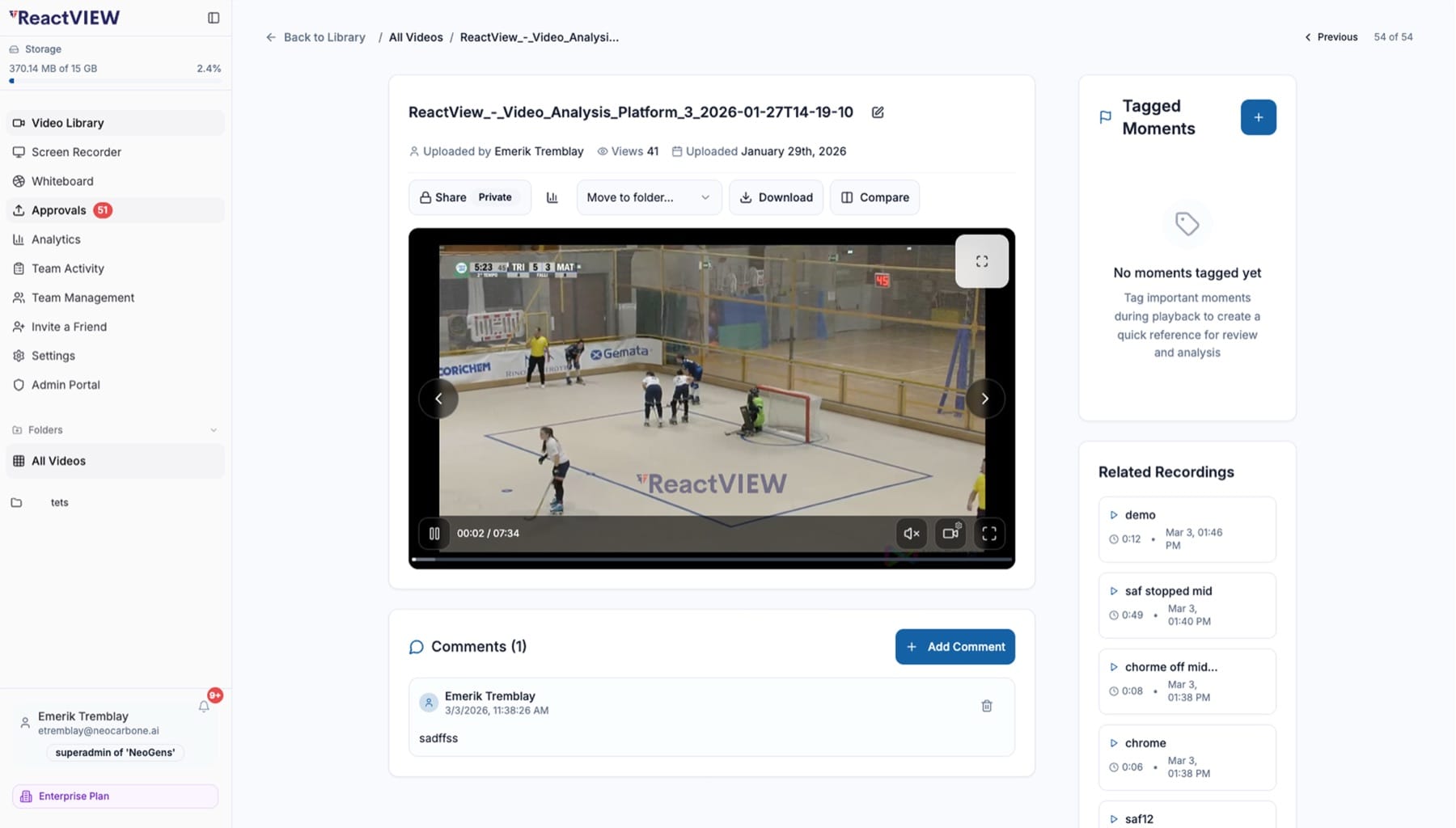
Tag the moments that matter at exact timestamps, comment on them in a thread, and put 2 clips side by side, such as this week's power play next to last month's. Every video has its own privacy setting, share link and folder.
Playboard
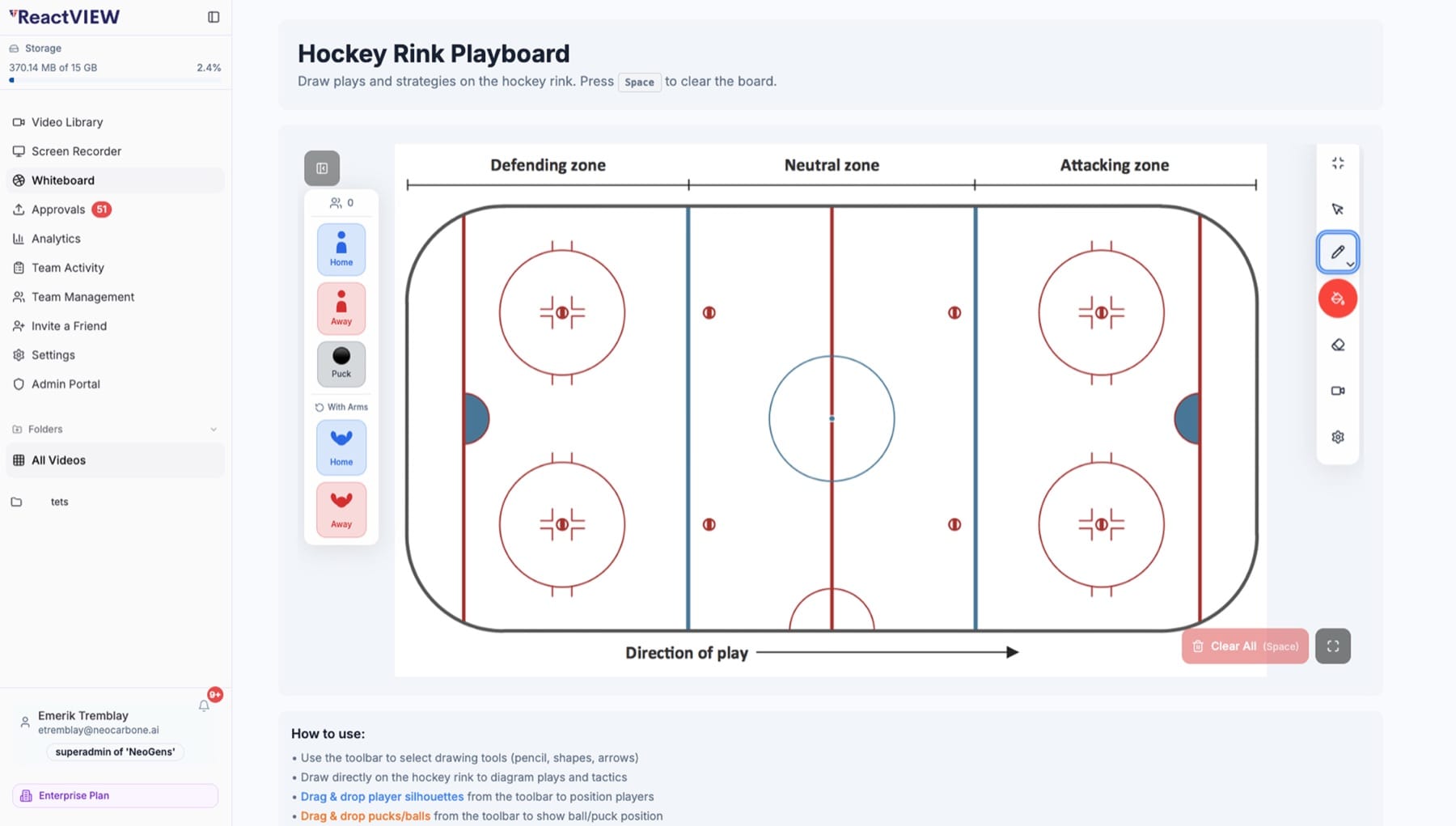
A rink diagram with the zones marked, draggable players and pucks, and freehand tools. A set piece drawn on the board records straight into the video library, so every chalk talk is saved as a clip.
Library
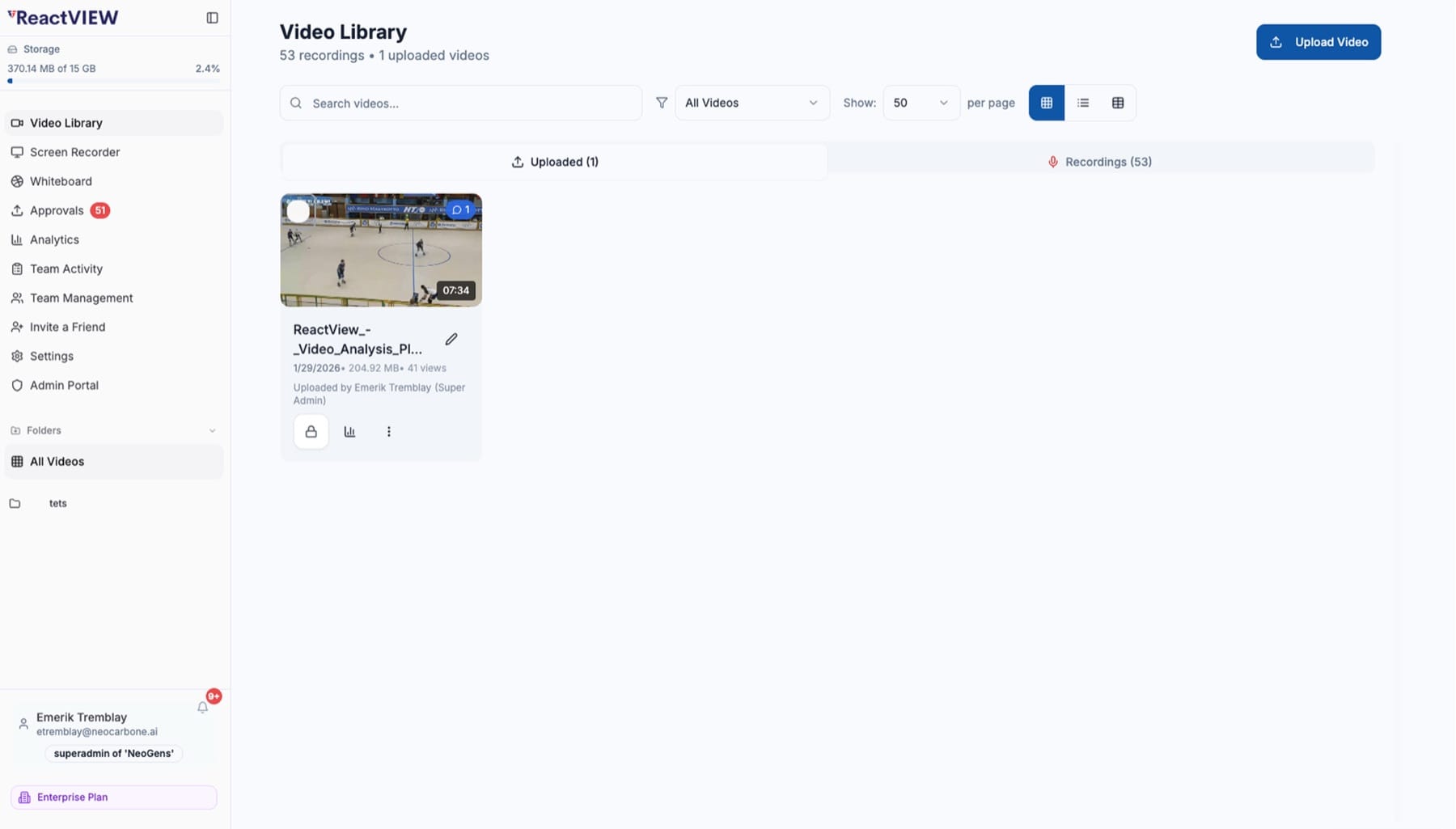
Footage is either uploaded from a camera or captured with the built-in screen recorder, which produces most of the film on the platform. Both go into the same searchable library, organized in folders.
Storage
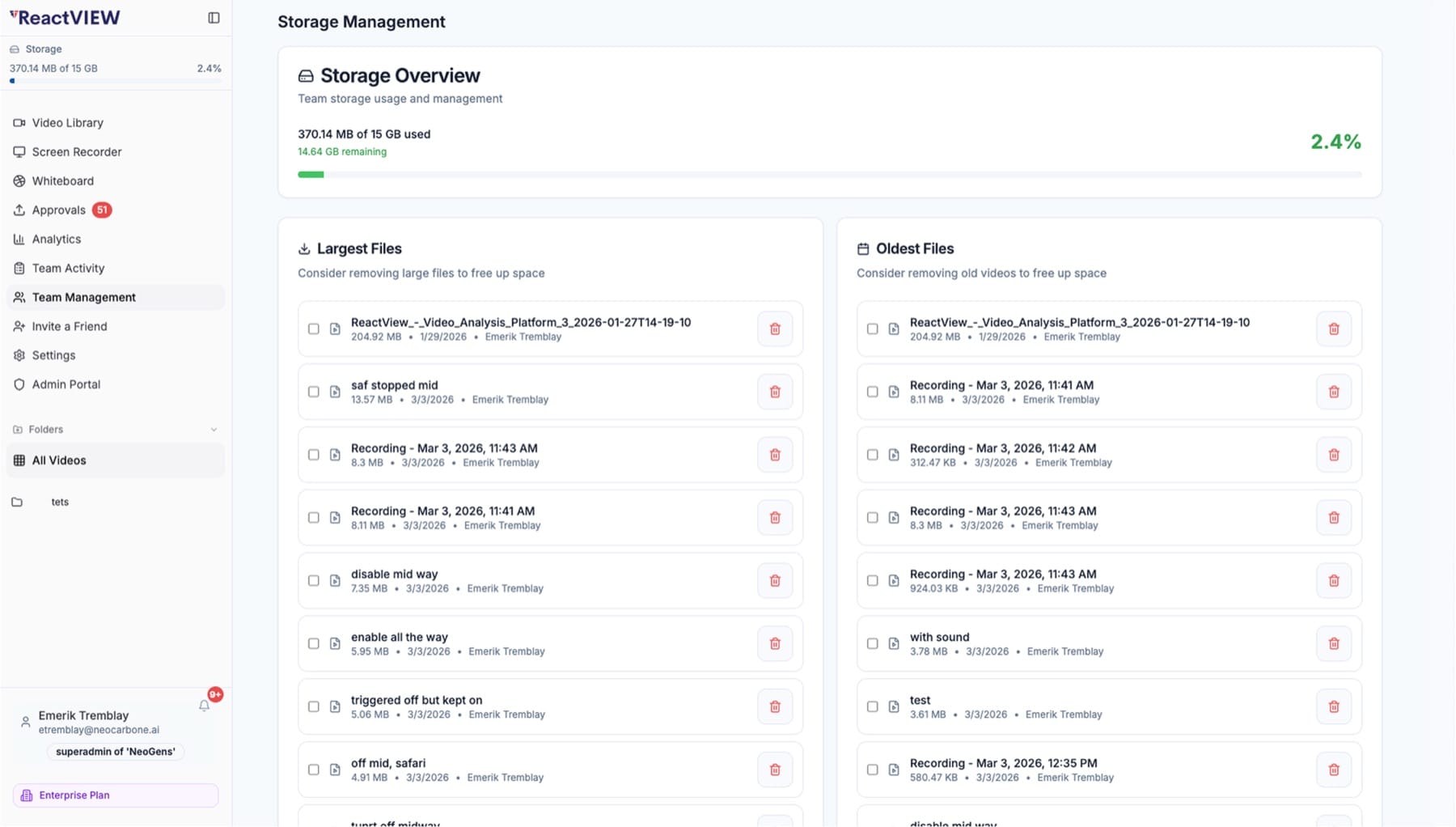
Every team has a storage allowance that stays visible at all times. Rather than block a coach mid-season with an error, the platform shows the largest and oldest files and lets the coach free up space directly.
Analytics
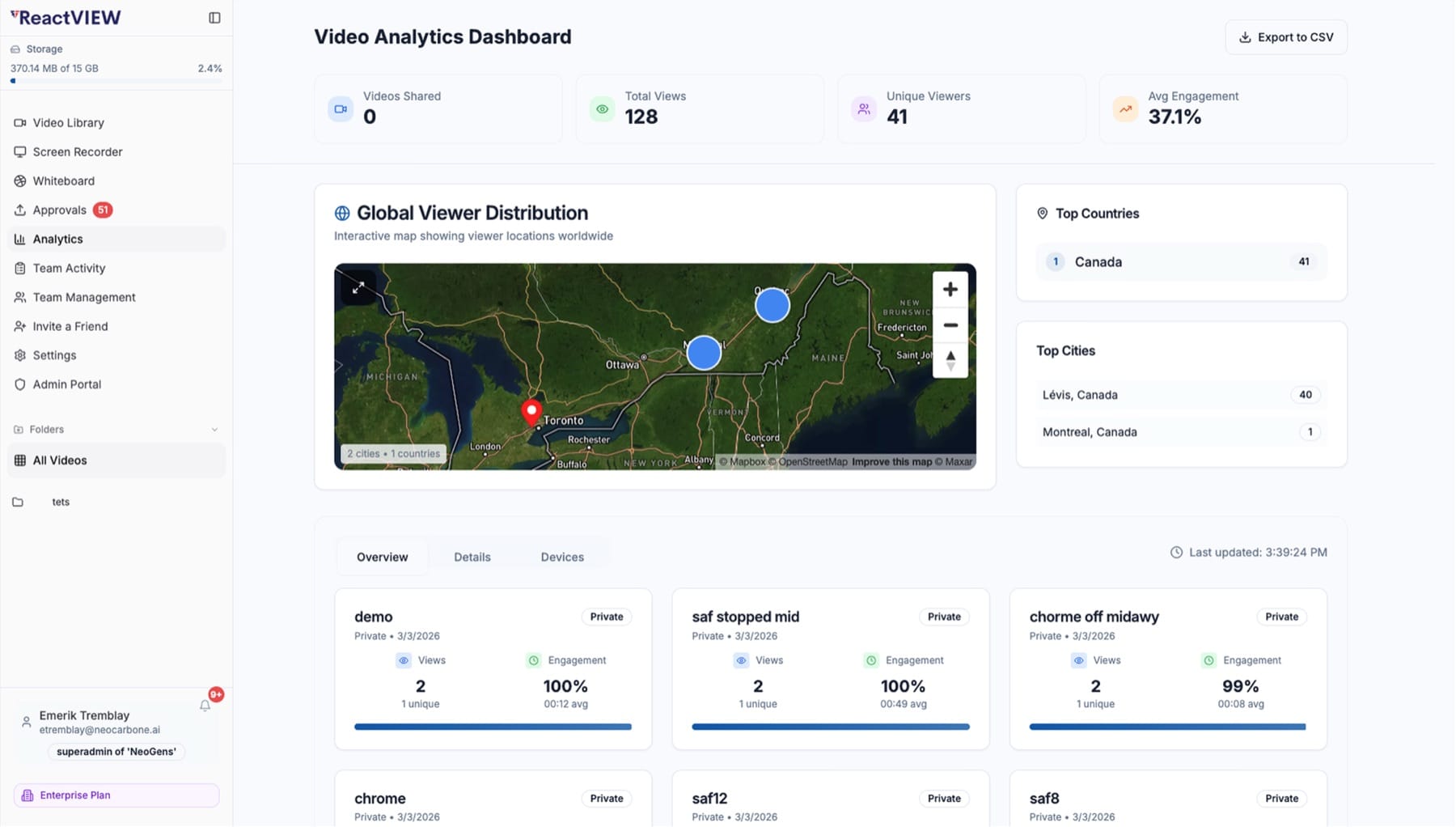
When a clip goes to 20 players, the useful question is who watched it and for how long. For each video, the platform reports views, unique viewers, how much people watched, their device and their location on a live map, all exportable to CSV.
Behind the scenes
With 500+ teams on the platform, operators need to know who a given user is, why a team is over quota and which videos failed overnight. The admin side answers those questions from a single interface.
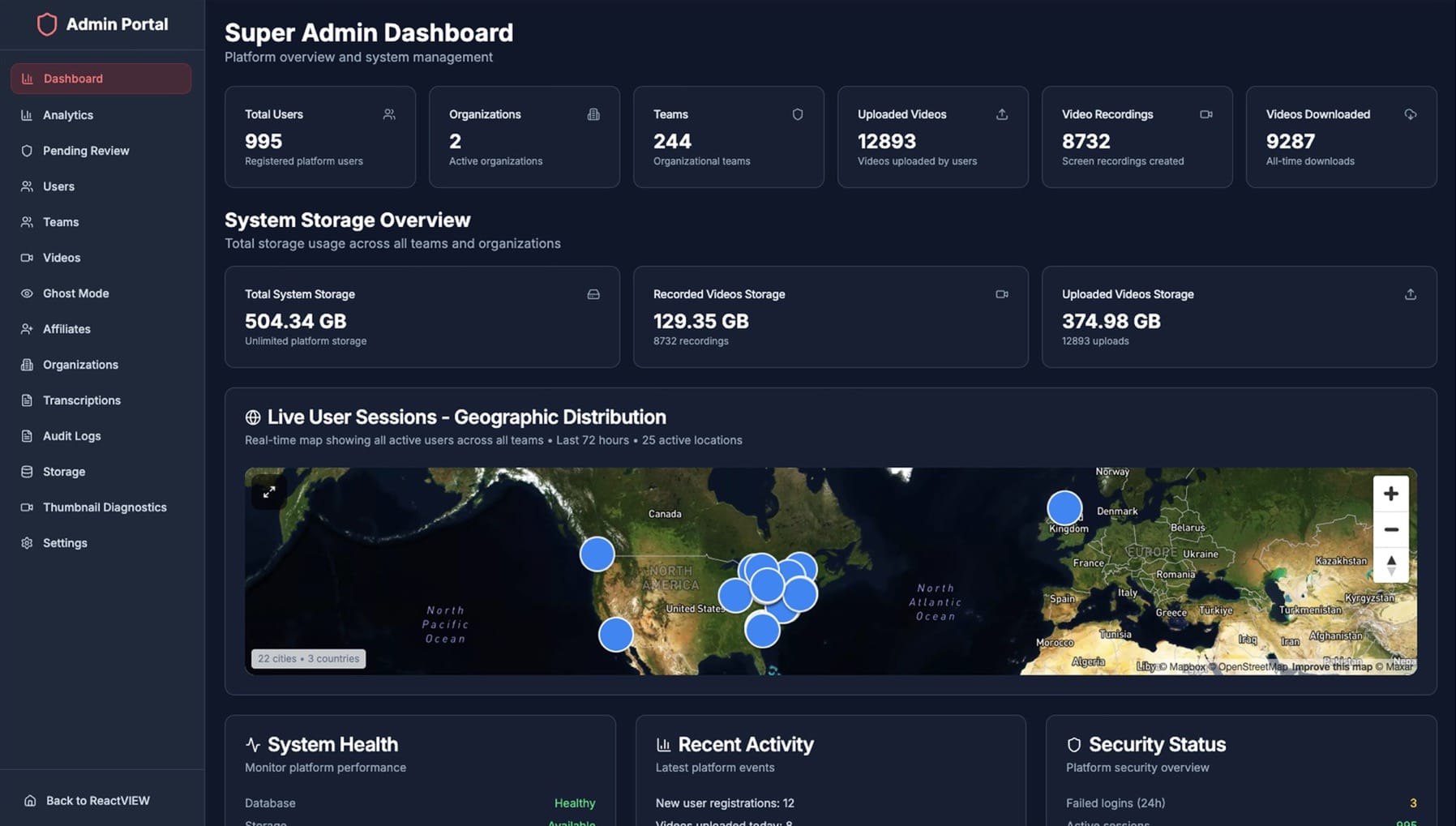
The whole platform on one screen: usage, storage, live sessions, health and security.
Teams & limits
Organizations expand into teams, each with its plan, sport and live usage against its coach, player and storage limits.
Users & support
Impersonate a user or use ghost mode to see exactly what they see, reset passwords and transfer people between teams, with every action logged.
Media repair
Every video in one filterable table, plus bulk thumbnail regeneration for the files whose frames failed to extract.
Signup moderation
Anyone can start a team instantly, and each new team enters a review queue with its trial, limits and referral source, to keep or delete.
Referrals
Affiliate codes tracked from first signup through to paid conversion, broken down team by team.
Storage ops
Platform storage split by source, with cleanup and health checks that catch files without records and records without files.
Under the hood
Beneath the screens, these systems decide whether a video platform keeps running at 500 teams or fails at 20.
Enforced at the data layer, so no one reaches another club's footage with a guessed link.
Resumable uploads, screen capture, thumbnail repair, and playback links that expire.
Accurate watch-through rates, geo-resolved viewers, device splits and CSV export.
Shared board state that merges concurrent edits, with presence and canvas recording.
Server-side storage accounting at 3 levels, race-safe under concurrent uploads.
Impersonation behind scoped permissions and a log, plus moderation and attribution.
The result
A platform used by 500+ elite teams in more than 50 countries, with the admin and operations tooling to keep it running
For coaches
Record, review, draw and share in one place, and see exactly who watched each clip.
For the business
Limits that cannot be bypassed, storage costs visible per team and every signup traced to its source.
For the operators
Support questions answered and the pipeline repaired without a database or a deploy.
Your turn
We apply the approach used on ReactView to any product that has to keep working as its user base grows.
Tenancy, quotas, media and permissions are what a product stands on. We build them early, before customers and revenue depend on them.
Support staff need to answer tickets and fix problems, so we give them admin tools instead of a database console.
Anything that matters to the business is shown on a screen the team can check at any time.
Describe the workflow your product has to support, even without a finished spec. We will tell you what it takes to build and what we would build first.
Have a project in mind?We build it and keep it running.
Book a call